TL;DR:
- A data-driven workspace improvement process enhances office efficiency and employee well-being through continuous assessment and redesign. Collecting occupancy data and employee feedback guides space utilization, while pilot zones and phased rollouts prevent costly mistakes. Technology amplifies improvements by optimizing room scheduling, maintenance, and communication, ensuring lasting success.
The workspace improvement process is a structured, data-driven methodology that transforms how office space, workflows, and physical environments support productivity and employee well-being. Business owners and facility managers who treat it as a one-time renovation project consistently underperform those who run it as a continuous cycle. Tools like OxMaint for occupancy analytics and Gable for space planning bring measurable precision to decisions that were once made by gut feel. The result: lower operating costs, higher employee satisfaction, and a physical environment that actually matches how people work.
How to assess your current workspace efficiency and employee needs
The workspace improvement process starts with measurement, not assumptions. Before moving a single desk or booking a contractor, you need a clear picture of how your space is actually used versus how you think it is used.
Start with occupancy data. Hybrid offices average about 42% peak occupancy, which means more than half your space sits empty during peak hours. That gap represents real money spent on conditioning, cleaning, and maintaining space nobody uses. Occupancy sensors placed at entry points, workstations, and meeting rooms give you hour-by-hour utilization data without relying on badge swipes or calendar bookings.
Layer in employee feedback. Sensors tell you where people sit. Surveys tell you why they avoid certain areas. A short pulse survey covering work style preferences, noise tolerance, and collaboration frequency takes 10 minutes per employee and surfaces patterns that no sensor can detect. Ask specifically about focus work needs, preferred meeting formats, and pain points with current layouts.
Identify underutilized zones. Look for areas with consistent occupancy below 20% during core hours. These are your highest-opportunity spaces for conversion or consolidation. Common culprits include oversized conference rooms booked for two-person calls, dedicated phone booths that nobody uses, and open-plan sections that feel too exposed for focused work.
Key data points to collect during your assessment:
- Peak and off-peak occupancy rates by zone and day of week
- Average meeting room utilization versus booking rate
- Employee-reported satisfaction with noise levels and privacy
- HVAC and janitorial cost per square foot by zone
Pro Tip: Collect 60–90 days of baseline data before making any layout changes. A single week of data captures anomalies, not patterns. Ninety days captures seasonal shifts, project cycles, and the real Monday-versus-Thursday difference in hybrid attendance.
OxMaint’s real-time dashboards let you visualize this data by zone, floor, and time of day without custom reporting. Gable’s space planning tools layer headcount projections on top of utilization data so you can model future scenarios before committing to a redesign.
What are the key steps in redesigning your workspace layout?
Once your data is in hand, redesign decisions become far less political. The numbers tell you what the space needs. Your job is to translate that into a layout that works for how your teams actually operate.
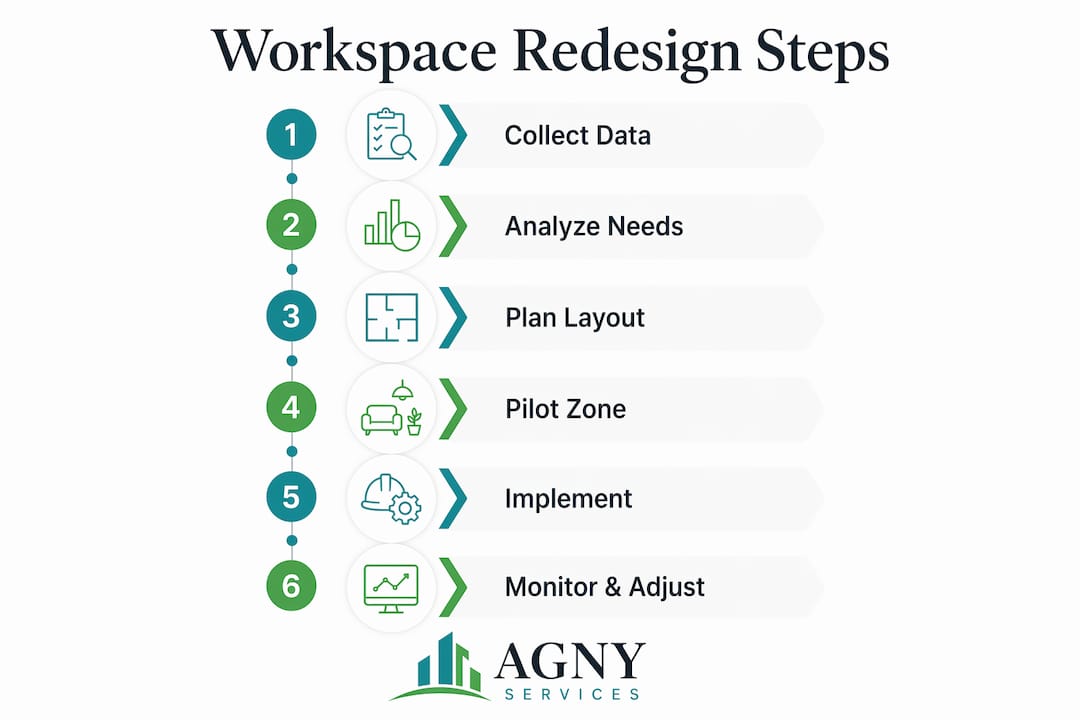
Adopt activity-based working as your organizing principle. Activity-based working (ABW) distributes space by function rather than department. Instead of assigning desks by team, you create zones for collaboration, focused individual work, and informal social interaction. ABW results in more effective space use and measurably improves employee satisfaction because people choose the environment that fits the task at hand.

Right-size your desk-to-employee ratio. Hybrid teams perform best with a desk-to-employee ratio of 0.6–0.7. A one-to-one ratio wastes real estate on days when 40–60% of staff work remotely. Modular and movable furniture lets you reconfigure quickly as attendance patterns shift across quarters.
Convert oversized conference rooms. 80% of meetings involve fewer than 5 attendees, yet most offices are built around 12-person boardrooms. Converting a single large conference room into three 4-person collaboration pods or two focus booths typically doubles the number of usable meeting spaces without adding square footage.
Here is a comparison of common layout approaches for hybrid offices:
| Layout Model | Best For | Key Tradeoff |
|---|---|---|
| Activity-Based Working | Teams with varied task types | Requires cultural shift away from assigned seating |
| Neighborhood Seating | Department-heavy organizations | Less flexible than full ABW |
| Hoteling with Reservations | High remote-work percentage | Needs reliable booking software |
| Fixed Assigned Desks | Roles requiring dedicated equipment | Wastes space on low-attendance days |
Run a pilot zone before full rollout. Pick one team or one floor and redesign it first. Run the pilot for 4–6 weeks, collect feedback, and measure utilization changes before scaling. This approach catches problems when they are cheap to fix.
Pro Tip: Avoid bolting furniture to the floor or walls during the pilot phase. Modular and movable partitions let you adjust based on real feedback rather than locking in a layout that looked good on paper.
Lighting also plays a larger role in zone effectiveness than most facility managers expect. A 2026 office lighting guide covers how light levels and color temperature affect focus and collaboration differently across zone types.
How can technology enhance the workspace improvement process?
Technology does not fix a poorly designed workspace. It amplifies what is already working and makes the gaps more visible. The right tools reduce waste, recover lost capacity, and give you the data to keep improving.
Deploy AI-powered room scheduling. AI-powered scheduling that releases rooms after 10–15 minutes of no check-in recovers 20–30% of wasted meeting room capacity. That is a significant gain in buildings where conference rooms are the most contested resource. The system automatically marks rooms as available when a booked meeting does not start, eliminating the “ghost booking” problem that plagues most offices.
Use occupancy-triggered maintenance. Occupancy-triggered maintenance reduces janitorial costs by 22% and extends HVAC filter life by 30%. Instead of cleaning every room on a fixed schedule, sensors trigger cleaning crews only when a space has been used. HVAC systems ramp down in unoccupied zones automatically. Organizations reduce conditioning costs by up to 28% on low-occupancy days like Mondays and Fridays using this approach.
Audit your software stack. Redundant tools create what productivity researchers call the “toggle tax.” Every time an employee switches between apps to find information or complete a task, they lose focus and time. Minimizing redundant software tools reduces cognitive overload and improves deep focus across the team. Consolidate project management, communication, and scheduling into the fewest platforms that cover your needs.
Shift toward asynchronous communication. Real-time messaging apps generate constant interruptions. Asynchronous tools like recorded video updates, shared documents, and structured comment threads let employees respond on their own schedule. This reduces the number of meetings needed and frees up the collaboration spaces you just redesigned for higher-value in-person work.
Monitor continuously, not quarterly. Workplace analytics platforms give you live utilization data. Use them to catch drift early. If a newly created focus zone starts getting used for group calls within six weeks of opening, that is a signal to add acoustic panels or adjust the zone boundaries before the problem becomes entrenched.
For offices converting large meeting rooms into productive collaboration zones, AV and low-voltage connectivity infrastructure is as important as the furniture layout. A well-designed pod with poor audio and display setup will be abandoned within a month.
How to implement and monitor workspace improvements for lasting success
Execution is where most workspace projects fail. The design looks right on paper, but the rollout creates confusion, resistance, and half-finished changes that frustrate everyone. A phased approach with clear milestones prevents this.
Define your pilot scope. Choose one team, one floor, or one functional zone. Set a specific start date, a 4–6 week test window, and clear metrics you will measure. Baseline data collection of 60–90 days and 4–6 weeks of pilot testing minimizes disruption and improves outcomes significantly compared to full-building rollouts.
Communicate before, during, and after. Tell affected employees what is changing, why, and what to expect during the transition. Silence breeds resistance. A single all-hands update before construction starts and a weekly email during the pilot phase is enough to keep people informed and reduce complaints.
Redesign processes before automating them. Automating broken workflows before redesigning leads to inefficiency. Map your current workflows, identify the bottlenecks, and remove the waste first. Then apply technology to the improved process. Automating a bad process just makes it fail faster.
Run pulse surveys post-implementation. Send a 5-question survey to pilot participants at the two-week and six-week marks. Ask about noise levels, ease of finding workspace, satisfaction with meeting room availability, and overall productivity. Direct observation during peak hours adds qualitative context that surveys miss.
Finish one improvement before starting the next. Successful business process improvement requires finishing one project before starting another to build a culture of continuous refinement. Stacking multiple simultaneous changes makes it impossible to isolate what worked and what did not.
Pro Tip: Track utilization and employee satisfaction scores for at least six months after each change. Workspace behavior shifts slowly. A layout that feels awkward in week two often becomes the preferred option by week eight once habits adjust.
Working with a commercial renovation contractor who understands phased office projects can significantly reduce downtime during the construction phases of your rollout.
Key takeaways
A structured workspace improvement process built on occupancy data, phased pilots, and continuous monitoring delivers measurably better outcomes than one-time redesigns driven by aesthetics alone.
| Point | Details |
|---|---|
| Start with 60–90 days of data | Baseline occupancy and employee feedback before any layout changes. |
| Apply activity-based working | Organize space by task type, not department, to match real work patterns. |
| Right-size desk ratios | Target 0.6–0.7 desks per employee for hybrid teams to avoid wasted real estate. |
| Use technology to recover capacity | AI scheduling and occupancy sensors can recover 20–30% of wasted space. |
| Phase rollouts with pilot zones | Test changes over 4–6 weeks before scaling to avoid costly full-building mistakes. |
What i’ve learned after years of workspace projects
Most business owners come to me with a floor plan and a furniture catalog. They want to know which layout looks best. My first question is always: what does your occupancy data say?
The hardest lesson I have seen clients learn is that workspace improvement is not a project with a finish line. It is a practice. The offices that perform best two years after a renovation are the ones where the facility manager is still running pulse surveys, still checking utilization dashboards, and still willing to move a partition when the data says a zone is not working.
The second thing I push back on consistently is the instinct to automate first. I have watched companies spend significant money on smart booking systems and sensor networks before they fixed the underlying problem: nobody wanted to come into the office because the space felt wrong. Technology layered on top of a poorly designed environment just makes the dysfunction more visible.
What actually works is involving employees early. Not in a token “we asked for feedback” way, but genuinely letting teams co-design their zones during the pilot phase. When people have a hand in the layout, they defend it. They adapt it. They tell you when something is not working before it becomes a problem.
The offices I am most proud of are not the ones with the most sophisticated sensor networks. They are the ones where the team lead says, “We actually want to come in on Thursdays now.” That is the real measure of a workspace improvement process done right.
— Grzegorz
How Agny can support your workspace transformation
Agny works with business owners and facility managers across New York on office renovation projects that require both structural precision and aesthetic quality. Whether you are converting underused conference rooms into collaboration pods, adding custom millwork to define activity zones, or doing a full floor renovation, Agny brings general contracting expertise to every phase of the project.
Financing a workspace renovation does not have to stall your timeline. Agny’s renovation financing options are structured specifically for commercial projects, giving you flexibility to phase improvements without depleting operating capital. For offices where aesthetics matter as much as function, Agny’s custom carpentry services deliver built-in storage, reception millwork, and partition systems that hold up to daily commercial use. Talk to Agny before your next workspace project.
FAQ
What is the workspace improvement process?
The workspace improvement process is a structured methodology for assessing, redesigning, and monitoring office space and workflows to increase efficiency and employee satisfaction. It typically includes baseline data collection, phased redesign, pilot testing, and continuous refinement.
How long does baseline data collection take?
Collect at least 60–90 days of occupancy and utilization data before making layout changes. This window captures real attendance patterns across hybrid schedules rather than isolated weekly anomalies.
What desk-to-employee ratio works best for hybrid offices?
A ratio of 0.6–0.7 desks per employee is the standard for hybrid teams. Fixed one-to-one ratios waste real estate on days when 40–60% of staff work remotely.
How much can occupancy sensors reduce operating costs?
Organizations using real-time occupancy data reduce conditioning costs by up to 28% on low-attendance days. Occupancy-triggered maintenance also cuts janitorial costs by 22% and extends HVAC filter life by 30%.
Should you automate workflows before or after redesigning them?
Always redesign workflows first. Automating a broken process accelerates its inefficiency rather than fixing it. Map bottlenecks, remove waste, then apply technology to the improved process.